The Taylor Swift presale crashed your plans. You refreshed for an hour, cleared two CAPTCHA walls, and made it through the virtual queue. Right when the seat picker loaded, the session dropped. By the time you reconnected, every decent seat was gone.
You are not alone. Ticketmaster's parent company Live Nation reported its ticketing division generated $841 million in Q4 2024 alone, up 14% year over year. The online event ticketing market now sits at $88.38 billion in 2026 and is climbing toward $105 billion by 2031.
With that kind of demand, platforms like Ticketmaster, AXS, and Live Nation deploy Incapsula, reese84 protection, device fingerprinting, and IP reputation scoring to shut out anything that does not look like a single person on a home internet connection.
Proxies for ticketing solve this by assigning clean residential IPs that pass those trust checks. I have tested proxy configurations across Ticketmaster US, AXS Europe, and regional ticketing platforms over back to back concert seasons. These 6 providers actually hold sessions through queues when it matters.
⚡ The Ticketing Proxy Problem Nobody Explains Properly
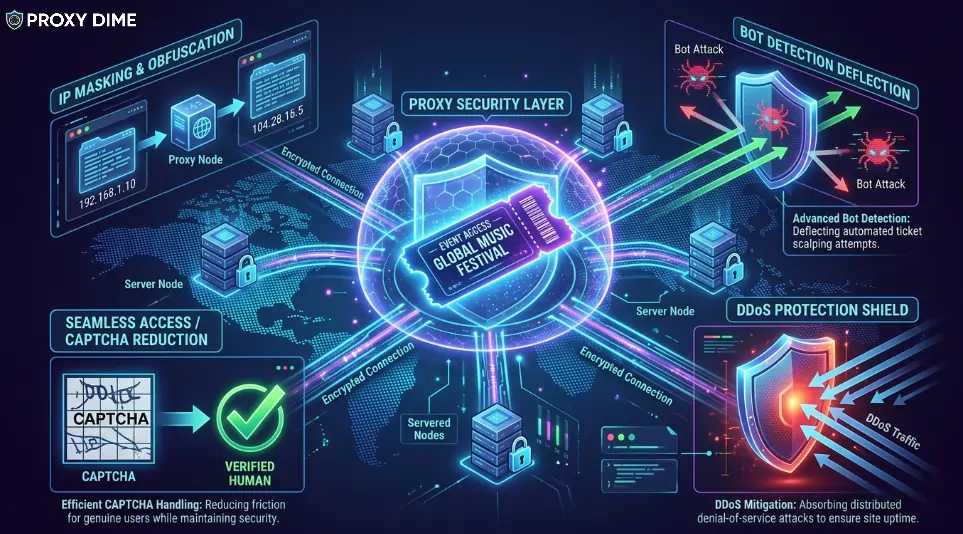
Proxies for ticketing assign your browser a different IP address so that the ticketing platform sees a genuine residential user rather than your actual connection. That sounds simple. The reality is more complicated than any other proxy use case.
Ticketing platforms run layered detection. Ticketmaster's reese84 system analyses your IP reputation, browser fingerprint, mouse movement, scroll speed, and click timing simultaneously. AXS tracks fingerprints more aggressively than IPs and links accounts by shared IP history.
Queue-It virtual waiting rooms reject datacenter IPs on sight. A standard rotating proxy that works fine for web scraping will get you banned before the queue even loads.
What you need is a residential or mobile proxy with sticky session support. Sticky sessions hold the same IP for the entire purchase flow, from queue entry through seat selection to checkout. If your IP changes mid-purchase, the platform kills the session.
Mobile proxies from 4G/5G carriers carry the highest trust because ticketing sites cannot block mobile IPs without harming legitimate customers using carrier-grade NAT.
Residential proxies are the minimum. Datacenter addresses get flagged instantly. Mobile IPs are the premium option that rarely fails.
Quick Tip: For proxies for ticketing, rotating residential proxies handle availability monitoring while sticky residential (or mobile) proxies should handle the actual purchase session. Prioritise providers with city-level geo-targeting so your proxy IP matches the event venue location, which reduces fraud flags.
🔥 6 Best Proxies for Ticketing 2026 In Detail
| Proxy Provider | Ticketing Strength | Made For |
|---|---|---|
| Decodo | 125M+ IPs with stickies | Concert queue warriors |
| NodeMaven | 95% clean IP filtering | Multi-profile ticket buyers |
| Bright Data | Ticketmaster scraper built in | Resale market analysts |
| Webshare | Free ticketing proxy start | First-time proxy users |
| Oxylabs | 10-minute sticky entry nodes | High-volume event teams |
| Proxy-Seller | Dedicated ticketing IPs | Seasonal ticket resellers |
1. Decodo
Decodo handles the two things that matter most in ticketing proxy setups. Their 125M+ residential and mobile pool across 195+ locations means you can match your proxy IP to virtually any event venue city worldwide.
And their sticky sessions hold a consistent IP throughout the entire purchase window, preventing the mid-checkout disconnects that waste hours of queue time. The real advantage for ticketing shows up in their mobile proxy offering at $2.25/GB, where real 4G/5G carrier IPs from 700+ mobile networks carry the kind of trust scores that Ticketmaster's reese84 system rarely questions.
Site Unblocker handles CAPTCHA walls automatically when monitoring ticket availability across multiple events. Serious concert goers who queue for high demand shows across multiple platforms will find the combination of pool depth and session stability keeps them connected when others drop out.
Pricing starts from $1.50/GB for residential and $2.25/GB for mobile proxies. 14-day money back guarantee included.
Pros
Cons
Why Decodo for ticketing proxies: Mobile 4G/5G IPs from real carriers are the closest thing to a guaranteed pass through Ticketmaster's detection. Carrier-grade NAT means these addresses are shared by thousands of legitimate users, making them nearly impossible to block without collateral damage. At $2.25/GB, the mobile tier is the smart investment for high-value ticket drops.
2. NodeMaven
NodeMaven filters proxy IPs specifically for the kind of reputation scoring that ticketing platforms rely on. Their algorithm checks every address before assigning it and maintains a 95% clean IP rate across the pool.
Why does that matter here? Ticketmaster maintains databases of flagged IP addresses based on previous bot activity, datacenter classification, and request patterns. A proxy with a dirty history gets rejected before the queue page even renders.
NodeMaven's 24-hour Super Sticky Sessions keep the same verified clean IP assigned to your browser profile for an entire day. That means you can set up your ticketing session hours before the sale opens and maintain the same identity through presale codes, queue entry, and final checkout without a single IP swap.
Buyers managing separate profiles for family members or fan club presales across Ticketmaster and AXS will find the IP filtering prevents the cross-contamination that links accounts together.
Pricing starts from €6.00/GB on the 5 GB plan. Trial available for €3.50 with 750 MB.
Pros
Cons
Why NodeMaven for ticketing proxies: Ticketmaster's IP reputation scoring system is the first gate you have to pass. If the IP fails that check, nothing else matters. NodeMaven's 95% clean rate means the IP your browser uses was verified clean before you even opened the Ticketmaster tab. The 24-hour sticky session means it stays that way through the entire sale window.
3. Bright Data
Bright Data goes beyond proxy routing for ticketing. They built a dedicated Ticketmaster scraper that runs on their own infrastructure with built-in proxy rotation, CAPTCHA solving, and auto-scaling.
For ticket resellers and market analysts who monitor price fluctuations, seat availability, and event listings across hundreds of shows simultaneously, this removes the engineering work entirely. The proxy network behind it spans 150M+ IPs with ZIP code-level targeting, which lets you appear as a local buyer at any venue in any city.
Their ad verification technology adapts well to ticketing because both use cases demand the same thing from a proxy. Clean residential identity, precise geographic placement, and zero detection. The Proxy Manager creates separate routing rules so your monitoring scraper uses rotating residential while your actual purchase sessions run through static ISP addresses, all from one platform.
Pricing starts from $5/GB on committed residential plans. Free trial with no credit card required.
Pros
Cons
Why Bright Data for ticketing proxies: The dedicated Ticketmaster scraper with auto-scaling proxy infrastructure is built for people who treat ticket resale as a business. Monitor hundreds of events, track pricing in real time, and purchase through separate static IPs. All from one dashboard without maintaining any servers.
4. Webshare
Webshare lets you test a ticketing proxy setup without spending anything. Their free tier provides 10 proxy servers with no credit card required, and they publish a step by step Ticketmaster proxy configuration guide covering Chrome, Windows, and Android devices.
For someone who has never used a proxy for ticket buying before, this is the easiest way to learn how the workflow actually functions. Set up the free proxy through their Chrome extension, visit Ticketmaster, confirm your IP changed using an online checker, and see if queue behaviour improves before investing in paid bandwidth.
The paid plans start from $2.99/month for 100 datacenter proxies, with residential options available for users who need higher trust scores. First-time proxy users who want to understand the mechanics before a major ticket sale will find Webshare's free entry point and clear guides remove every barrier to getting started.
Pricing starts from $2.99/month for 100 datacenter proxies. 10 free proxies with no credit card.
Pros
Cons
5. Oxylabs
Oxylabs approaches ticketing from an infrastructure perspective that large operations demand. Their 100M+ residential pool supports sticky entry nodes that hold the same IP for up to 10 minutes per port, with country-specific ports ranging from 10000 to 49999.
For ticketing, 10-minute stickies might sound short. But combined with port rotation, you can chain sessions by switching ports the moment one expires, maintaining near-continuous coverage through extended queue waits.
The real power appears when running availability monitoring across dozens of events simultaneously. Unlimited concurrent sessions mean your monitoring scripts check every show on your list in parallel without queuing.
City targeting and ASN-level control let you appear local to any venue market. Organisations running large-scale event monitoring operations or ticket resale businesses tracking inventory across platforms will find the session architecture and parallel capacity worth the premium.developers.
Pricing starts from $8/GB for residential proxies. 7-day free trial for verified accounts.
Pros
Cons
6. Proxy-Seller
Proxy-Seller gives seasonal ticket resellers something rotating pools cannot. A dedicated IPv4 address that belongs exclusively to you for the entire rental period. Ticketmaster tracks IP history across sessions. When you use a shared pool, another user's flagged behaviour taints the IP before you even connect.
With a dedicated address from Proxy-Seller, the IP's reputation is entirely your own to protect. Unlimited bandwidth removes the anxiety of watching data usage climb during long queue waits that consume more background traffic than you expect.
The 220+ country coverage handles virtually any regional ticketing platform globally. Weekly rentals mean you can lease IPs specifically for a concert season, return them after, and lease fresh ones for the next round of shows. Resellers who work specific seasons (summer festivals, holiday tours, sports playoffs) will appreciate the flexibility of short commitments.
Pricing starts from $0.70/IP for dedicated IPv4 with unlimited bandwidth.
Pros
Cons
🌐 Ticketing Proxy Network Specs 2026
| Proxy Provider | Sticky Session Length | Pool Size |
|---|---|---|
| Decodo | Up to 30 min | 125M+ IPs |
| NodeMaven | Up to 24 hours | 30M+ IPs |
| Bright Data | Configurable | 150M+ IPs |
| Webshare | Not available (free) | 40M+ IPs |
| Oxylabs | Up to 10 min/port | 100M+ IPs |
| Proxy-Seller | Permanent (dedicated) | 20M+ rotating |
👉 5 Factors That Decide Whether Your Ticket Proxy Works or Fails
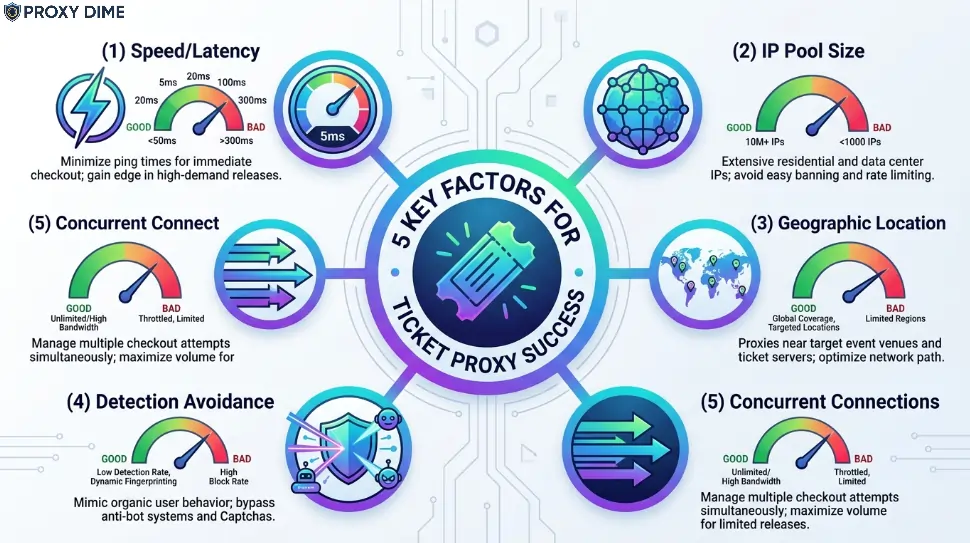
1. Match the IP Type to the Platform's Detection
Ticketmaster, AXS, and Queue-It each detect proxies differently. Ticketmaster's reese84 system scores IP reputation heavily. AXS focuses more on browser fingerprinting. Queue-It rejects datacenter ranges outright. Residential IPs pass all three. Mobile carrier IPs pass with the highest trust. Datacenter IPs fail on Ticketmaster and Queue-It nearly every time. Use residential as the baseline and mobile for your highest-priority events.
2. Pin the Proxy to the Venue's City
Ticketing platforms flag purchases where the buyer's IP location does not match the event region. Someone appearing to buy London O2 tickets from a Tokyo IP raises fraud scores instantly. Decodo, Bright Data, and Oxylabs offer city-level proxy targeting that places your session in the same metropolitan area as the venue. Always select a proxy IP in the event's city or at minimum the same country.
3. Sticky Sessions Must Outlast the Queue
A typical Ticketmaster queue wait for a high demand show runs 15 to 45 minutes. Some presales extend beyond an hour. If your proxy rotates the IP during that wait, you lose your queue position and start over. NodeMaven's 24-hour sticky sessions provide the longest guaranteed hold on this list. Decodo's 30-minute stickies cover most situations but require monitoring. For extended waits, always choose the longest available sticky duration.
4. Speed Matters at the Exact Moment of Checkout
The queue gets you to the seat map. After that, you have roughly two minutes to select seats and complete payment before they release back to the pool. Proxy latency during this window directly affects whether you keep those seats. Dedicated datacenter IPs from Proxy-Seller provide the fastest raw speed but carry detection risk. The best compromise is ISP proxies (available from Decodo and Bright Data) that combine residential trust with datacenter-like response times.
5. Budget for Bandwidth You Did Not Expect to Use
Queue pages look simple but continuously exchange data with the server to maintain your position. A 30-minute queue wait can consume 200 to 500 MB depending on the platform. Multiply that across several presale sessions per month and the bandwidth bill grows quickly. Webshare's free tier lets you test without risk. For active use, Proxy-Seller's unlimited bandwidth model at $0.70/IP removes the per-GB calculation entirely.

More Guides On Proxy Dime
📌Final Thoughts
Decodo's mobile proxies at $2.25/GB deliver the highest trust level for getting through Ticketmaster and AXS queues without detection. NodeMaven's 95% clean IP filtering paired with 24-hour sticky sessions provides the most reliable residential path for buyers managing multiple presale profiles.
Bright Data makes sense for resale operations that need built-in Ticketmaster scraping alongside proxy routing. Start with Webshare's free proxies to learn the setup before a major sale.
Test your configuration days before the actual on-sale date, not five minutes before. The best proxy for ticketing is one you have already verified works on that specific platform. Everything else is just hoping.