
You are one kill from winning a ranked match in Valorant. Your crosshair is on the enemy. You click. Nothing happens for 200 milliseconds. By the time the server registers your shot, you are already dead. Lag cost you the round and probably your rank. The global gaming market hit $261 billion in 2025 and is projected to reach $539 billion by 2034, with 3.6 billion players now competing online across every continent.
More players means more crowded servers, more region locks, and more ISP throttling. A solid gaming proxy server fixes all three problems by routing your traffic through optimised paths, masking your IP from DDoS attacks, and unlocking foreign game servers instantly.
I have tested proxy setups across competitive FPS titles, MMOs, and mobile battle royale games over the past three years. This guide covers the 10 best gaming proxy servers that actually reduce latency and open up restricted content this year.
🕹️ How Gaming Proxy Servers Actually Reduce Lag
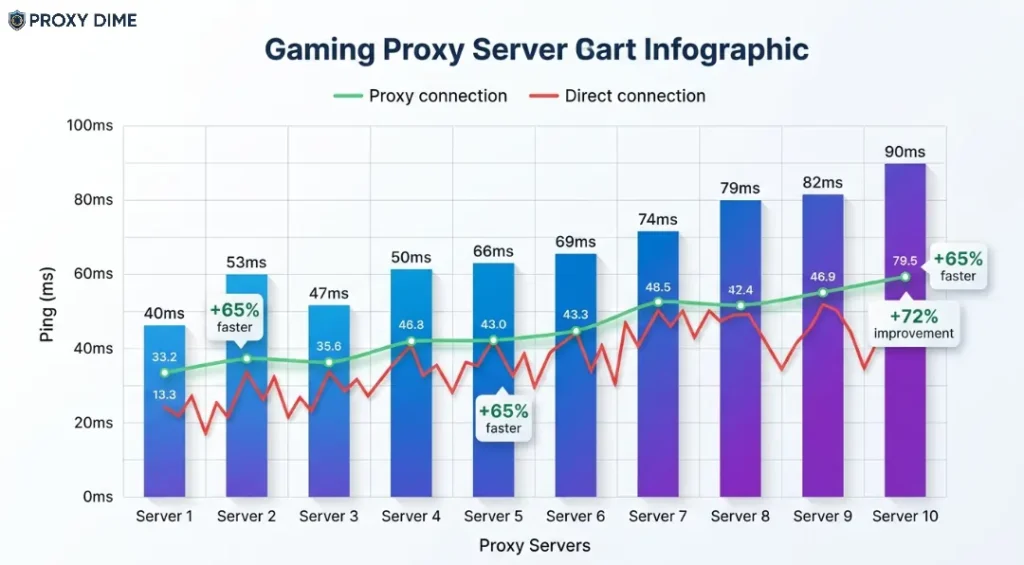
A gaming proxy server sits between your device and the game server. It intercepts your connection and reroutes it through a different path, often one that is physically shorter or less congested than the default route your ISP chooses. Your ISP does not always pick the fastest path. It picks the cheapest one. A proxy gives you a better route.
For online gaming, the protocol matters enormously. SOCKS5 proxies handle both TCP and UDP traffic, and UDP is what most multiplayer games actually use for real-time data. Standard HTTP proxies cannot carry UDP packets. That means they are useless for Fortnite, Call of Duty, Valorant, Apex Legends, and nearly every other competitive title. Always choose SOCKS5 when shopping for gaming proxies.
Beyond latency, gaming proxies unlock geo-restricted servers and protect against DDoS attacks by hiding your real IP. When a game launches early in Japan or Canada, a proxy in that region lets you play before your local release date. And in competitive lobbies where salty opponents sometimes resort to IP flooding, your proxy absorbs the attack instead of your home connection.
Quick Tip: For gaming proxy servers, SOCKS5 with UDP support always outperforms HTTP proxies because multiplayer games transmit real-time data over UDP packets. Prioritise providers offering static ISP or dedicated datacenter IPs with sub-50ms first-hop latency.
🏆 Gaming Proxy Server Specs Compared 2026
| Proxy Provider | Protocol Support | IP Pool Size |
|---|---|---|
| Decodo | SOCKS5, HTTP/S | 125M+ IPs |
| Webshare | SOCKS5, HTTP/S | 40M+ IPs |
| Oxylabs | SOCKS5, HTTP/S | 100M+ IPs |
| ZenRows | HTTP/S API only | 55M+ IPs |
| Thordata | SOCKS5, HTTP/S | 100M+ IPs |
| Bright Data | SOCKS5, HTTP/S | 150M+ IPs |
| Proxy-Seller | SOCKS5, HTTP/S | 20M+ rotating |
| IPRoyal | SOCKS5, HTTP/S | 32M+ IPs |
| NodeMaven | SOCKS5, HTTP/S | 5M+ filtered |
| MarsProxies | SOCKS5, HTTP/S | 1M+ dedicated |
1. Decodo
Decodo gives competitive gamers exactly what they need from a proxy. Full SOCKS5 support with UDP protocol handling across 125 million+ residential and ISP addresses in 195+ locations. That UDP support is critical. Without it, your Valorant or Apex packets simply will not route through the proxy.
Their static ISP proxies deliver consistently low response times because the IPs sit on real internet provider infrastructure rather than shared data centres. Sticky sessions hold for up to 30 minutes through SOCKS5, which keeps your gaming session stable without sudden IP changes mid-match. FPS players who need a clean, trusted IP in a specific region for ranked matchmaking will find Decodo reliable and fast to set up.
Pricing starts from $6/GB for SOCKS5 residential and $2.50/IP for static ISP proxies. Free trial available through the dashboard.
Pros
Cons
Why Decodo for gaming proxy servers: The combination of SOCKS5 UDP handling and static ISP addresses produces genuinely lower ping than standard residential proxies. You get a real ISP address that game servers trust, with response times fast enough for competitive ranked play.
2. Webshare
Webshare remains the only provider on this list offering permanently free gaming proxies. Their free tier includes 10 SOCKS5 datacenter proxies that support both TCP and UDP traffic. That is enough to test whether a proxy setup actually improves your ping on a specific game before spending money.
The paid plans unlock rotating and static residential addresses across 195+ countries for gamers who need specific region access. Their gaming use case page specifically highlights latency reduction, geo-unblocking for region locked titles, and DDoS protection through IP masking. Budget-conscious gamers who want to try proxy-routed gaming without financial risk should start here.
Pricing starts from $2.99/month for 100 datacenter SOCKS5 proxies. Free tier permanently available.
Pros
Cons
Why Webshare for gaming proxy servers: The free SOCKS5 tier with UDP support lets you validate whether proxy routing actually improves your connection to specific game servers before committing any budget. No other provider offers this risk-free testing path for gamers.
3. Oxylabs
Oxylabs fields the largest SOCKS5 proxy network available for gaming. Over 100 million residential IPs with unlimited concurrent sessions mean your game traffic never competes with other users for bandwidth on the same address. Their SOCKS5 implementation supports full UDP traffic handling, which is non-negotiable for real-time multiplayer titles.
City-level targeting lets you connect to game servers as if you are sitting in that exact location. For esports teams practising on foreign servers or streamers needing stable connections across multiple regions simultaneously, the pool depth ensures you never run out of clean, fast addresses.
Pricing starts from $8/GB for residential SOCKS5 proxies. Free trial available for business accounts.
Pros
Cons
Why Oxylabs for gaming proxy servers: When you need absolute certainty that your proxy IP is clean, fast, and will not drop mid-tournament, the 100M+ pool with city targeting delivers. Esports organisations and professional streamers operating across multiple regions simultaneously will find the investment justified.
4. ZenRows
ZenRows serves a different gaming audience entirely. Instead of routing live gameplay, their platform excels at extracting game data from protected websites. Think in-game market price tracking on Steam, player stat scraping from game leaderboards, or monitoring limited edition skin drops across platforms with aggressive anti-bot protection.
Their API handles Cloudflare and DataDome shields that block standard scrapers from accessing game-related web content. The 55 million residential IPs behind the API ensure your data collection runs do not get throttled. Game data miners and esports analysts building dashboards from scraped game statistics will find ZenRows purpose-built for their workflow.
Pricing starts from $69/month on the Developer plan with 250K API results.
Pros
Cons
5. Thordata
Thordata gives mobile and casual gamers access to SOCKS5 proxy routing at prices that undercut every competitor on this list. Their residential pool covers 100M+ addresses across 195+ countries with full HTTP, HTTPS, and SOCKS5 protocol support.
At $1.80/GB for residential traffic (dropping to $0.49/GB at higher volumes), a weekend of proxy-routed mobile gaming costs practically nothing. They also offer an unlimited residential tier at $69 per day for gamers who want to marathon through a newly unlocked foreign game release without worrying about bandwidth caps.
The platform supports unlimited sticky sessions so your game connection holds steady throughout your play session.
Pricing starts from $1.80/GB for residential SOCKS5. 1 GB free trial on request.
Pros
Cons
Why Thordata for gaming proxy servers: The $69 unlimited daily tier is built for game launch weekends. When a title drops early in another region and you want to play all weekend without bandwidth worries, nothing else on this list matches the value.
6. Bright Data

Bright Data provides the most precise geographic targeting of any gaming proxy on this list. Their SOCKS5 network spans 150 million+ IPs across residential, datacenter, and ISP types with targeting down to ZIP code and ASN level.
That granularity matters for gaming. Some titles match you with players based on your perceived location. By selecting a specific neighbourhood-level proxy, you control which server region and player pool you land in.
Their Proxy Manager software runs locally and lets you create custom routing rules. Route your game traffic through one region while keeping your browser on your home IP. Early access hunters who want to play Japanese or Korean game releases days before global launch will find the location precision unbeatable.
Pricing starts from $5/GB on committed plans. SOCKS5 available on port 22228.
Pros
Cons
7. Proxy-Seller
Proxy-Seller offers dedicated IPv4 and IPv6 addresses across 220+ countries that you rent exclusively for your gaming sessions. Nobody else uses your IP. That exclusivity matters for gamers because shared proxy pools carry the risk of someone else's bad behaviour getting your address banned from a game server.
Their dedicated proxies support SOCKS5 connections and come with unlimited bandwidth included in the rental price. You can lease a specific gaming IP for as short as one week if you only need it for a particular tournament or game launch. Multi-account managers running several game accounts across different regions simultaneously will appreciate the isolation that dedicated IPs provide.
Pricing starts from $0.70/IP for dedicated IPv4 proxies with unlimited bandwidth.
Pros
Cons
8. IPRoyal
IPRoyal offers static residential proxies specifically suited for console gamers. Their 32 million+ IP pool includes dedicated addresses from real ISPs in 195+ countries, and these static IPs produce more stable ping than rotating alternatives because your connection never switches mid-session.
SOCKS5 support with TCP and UDP handling means PlayStation, Xbox, and PC game traffic routes cleanly through their servers. The per-GB pricing model means your bandwidth never expires, which is perfect for gamers who play in bursts rather than daily.
Console players dealing with strict NAT types and matchmaking restrictions will find static residential IPs solve most connectivity headaches.
Pricing starts from $7/GB for residential proxies. Non-expiring bandwidth.
Pros
Cons
9. NodeMaven
NodeMaven filters every IP in their pool through quality scoring before assigning it to you. That filtering matters enormously for gaming. A proxy IP that was previously used for spam or scraping might already be flagged in a game's anti-cheat database.
NodeMaven's algorithm screens out these problematic addresses and delivers only clean, high-trust IPs. Their SOCKS5 support handles both TCP and UDP across residential addresses with intelligent routing that minimises latency.
Gamers creating multiple accounts for different regions or managing alt accounts for content creation will appreciate the cleanliness of the assigned addresses.
Pricing starts from $8/GB for filtered residential proxies. Trial available on request.
Pros
Cons
10. MarsProxies
MarsProxies markets directly to gamers with some of the fastest response times in the industry. Their dedicated datacenter proxies deliver latency between 6ms and 120ms depending on your distance to the server, with unlimited bandwidth and 99.9% uptime built into every plan. SOCKS5 support ensures UDP game traffic routes properly.
The dedicated proxy model means you own the address exclusively during your rental, and nobody else's activity affects your gaming experience. Speed-obsessed competitive players who measure their proxy in single-digit milliseconds rather than just “fast enough” will find MarsProxies built for their mentality.
Pricing starts from $2/proxy for dedicated datacenter addresses with unlimited bandwidth.
Pros
Cons
✅ The Gaming Proxy Checklist Nobody Talks About
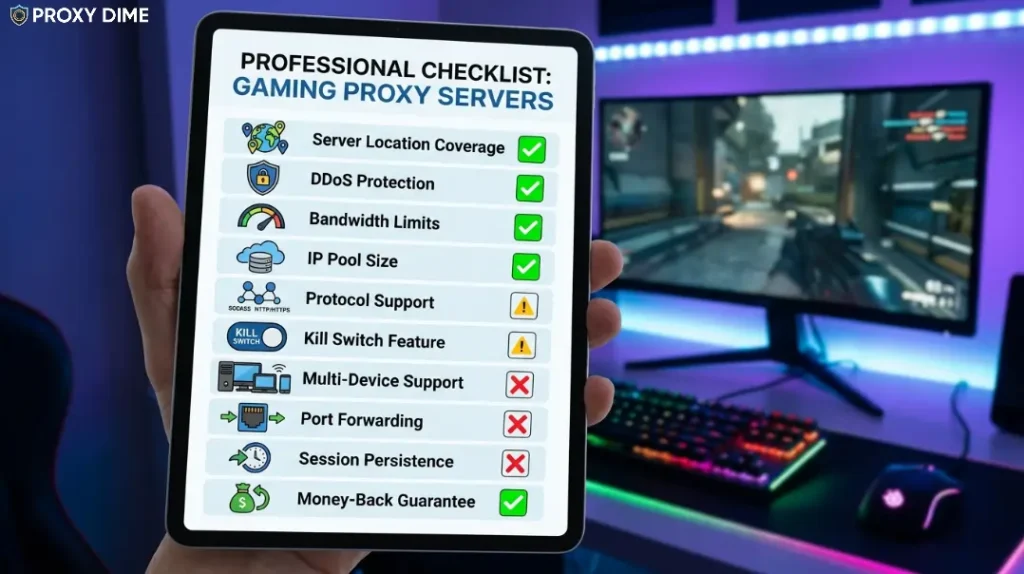
1. Does It Actually Support UDP?
This single question eliminates half the proxy market for gamers. Most multiplayer games send real-time position, shooting, and movement data over UDP packets because TCP is too slow for frame-by-frame updates.
If a provider only offers HTTP proxies, your game traffic cannot route through them at all. Every provider on this list (except ZenRows, which serves a different purpose) supports SOCKS5 with UDP. Confirm this before purchasing anything.
2. How Close Is the Proxy to the Game Server?
The proxy only helps if it shortens your route. A proxy in London does nothing for a player in Mumbai trying to reach a Singapore game server. You need a proxy geographically positioned between you and the game server, or very close to the server itself.
Test with ping commands before committing to a monthly plan. Providers like Bright Data and Proxy-Seller offer enough locations to optimise this, but cheaper providers may have gaps in your specific region.
3. Static or Rotating for Gaming?
Static. Almost always static. A rotating proxy assigns a new IP every few minutes or every request. During a ranked match, that means your connection drops and reconnects with a new address. Game servers interpret that as suspicious behaviour and may kick you. Static ISP or dedicated datacenter proxies hold the same address for hours or days. Choose rotating only for game data scraping, not live gameplay.
4. Will the Game's Anti-Cheat Flag the IP?
Anti-cheat systems like Easy Anti-Cheat, BattlEye, and Vanguard fingerprint your connection. Datacenter IPs are more likely to trigger flags than residential addresses because they originate from hosting providers rather than household ISPs.
NodeMaven's IP quality filtering specifically addresses this by removing flagged addresses. If you play competitive titles with aggressive anti-cheat, residential or ISP proxies carry lower risk than datacenter alternatives.
5. What Does a Gaming Proxy Actually Cost Per Month?
A casual gamer using a static ISP proxy in one region might spend $5 to $15 per month. Competitive players routing through premium residential SOCKS5 with heavy bandwidth might spend $30 to $80 monthly. Thordata's $69 unlimited daily tier is ideal for binge weekends.
Webshare's free tier handles basic testing. Calculate how many hours you play and how much bandwidth your specific game consumes before choosing a pricing model.
❓ Gaming Proxy Questions Gamers Actually Ask
What is a gaming proxy server?
A gaming proxy server routes your game traffic through an intermediary server to reduce latency, bypass geo-restrictions, and hide your IP address. It sits between your device and the game server, optimising the data path. SOCKS5 proxies are preferred because they handle the UDP packets that multiplayer games require.
How does a gaming proxy reduce ping?
Your ISP often routes traffic through inefficient paths. A gaming proxy can provide a shorter route between your device and the game server, trimming unnecessary network hops. The proxy must be geographically positioned to actually shorten this path. A poorly placed proxy adds latency instead of removing it.
Which proxy type is best for online gaming?
SOCKS5 proxies with UDP support are the only practical choice for live multiplayer gaming. Static ISP proxies offer the best combination of low latency and high trust with game servers. Dedicated datacenter proxies work if speed is your only concern, but they carry higher ban risk from anti-cheat systems.
How much do gaming proxy servers cost?
Prices range from completely free (Webshare's 10 SOCKS5 proxies) to $8/GB for premium residential SOCKS5 from Oxylabs. Dedicated datacenter gaming proxies start around $0.70/IP from Proxy-Seller with unlimited bandwidth. Thordata's unlimited daily tier at $69 suits heavy gaming weekends.
Are gaming proxies legal to use?
Using a proxy server for gaming is legal in virtually all countries. However, some game publishers prohibit proxy or VPN usage in their terms of service. Breaking those terms risks account suspension rather than legal consequences. Always check your specific game's rules before routing through a proxy.
Can a gaming proxy protect me from DDoS attacks?
Yes. A gaming proxy hides your real IP address behind the proxy server's address. If someone targets your connection with a DDoS attack, the traffic hits the proxy infrastructure instead of your home network. Providers with enterprise-grade infrastructure like Oxylabs and Bright Data absorb these attacks without affecting your gameplay.
Do free proxies work for gaming?
Webshare offers 10 free SOCKS5 proxies that genuinely handle gaming traffic. Beyond that, free proxy lists are unreliable for gaming. They produce inconsistent ping, frequently disconnect mid-match, and often lack UDP support entirely. For anything beyond casual testing, a paid plan with guaranteed uptime is worth the investment.

🎯 Final Thoughts
Decodo delivers the best balance of SOCKS5 UDP support and ISP proxy speed for competitive gaming. Thordata wins on pure value with the cheapest per-GB residential bandwidth and an unlimited daily option for launch weekends. Webshare gives you a genuine free starting point to test whether proxy routing actually improves your specific game connection.
Most providers here offer trials or low-cost entry tiers. Test your actual game against two or three options before locking into a monthly plan. The best gaming proxy server is the one that measurably lowers your ping on your specific title. Not the one with the longest feature list on a marketing page.