The harvester pulled 400 URLs and then stopped. Every proxy in the list failed Google's check. The thread count was set to 50, but every connection timed out because the datacenter IPs had been flagged weeks ago. Three hours of keyword research and backlink analysis, gone.
Anyone who has run ScrapeBox with cheap or overused proxies knows that exact frustration. ScrapeBox still calls itself the “Swiss Army Knife of SEO” and it earns that title. The keyword harvester, mass blog commenter, backlink checker, email scraper, and rank tracker all depend on one thing: proxies that pass Google, Bing, and target site checks without getting flagged mid-job.
The problem is that ScrapeBox burns through IPs fast. A 100-thread harvesting session can exhaust a small proxy list in minutes.
The seven proxies for ScrapeBox below work across harvesting, commenting, and checking workflows. Each one was evaluated against the threading model, protocol support, and rotation needs that ScrapeBox specifically demands. Here is where each one fits.
Why ScrapeBox Proxies Fail and What Actually Works
Proxies for ScrapeBox are HTTP, HTTPS, or SOCKS5 proxy addresses loaded into ScrapeBox's Proxy Manager to distribute scraping requests across multiple IPs. ScrapeBox uses a threaded architecture.
Each thread opens a separate connection to Google, Bing, or the target site through a different proxy address. The tool rotates through the proxy list automatically, but it does not manage the quality of those proxies for you.
That threading model is where most setups break. Google limits automated queries aggressively. If you load 50 datacenter proxies and set 50 threads, Google flags the entire subnet within minutes because the IPs share a recognisable datacenter range.
The harvester returns empty results. The comment poster fails on every blog. The backlink checker reports false negatives because the target site blocked the request before it reached the page.
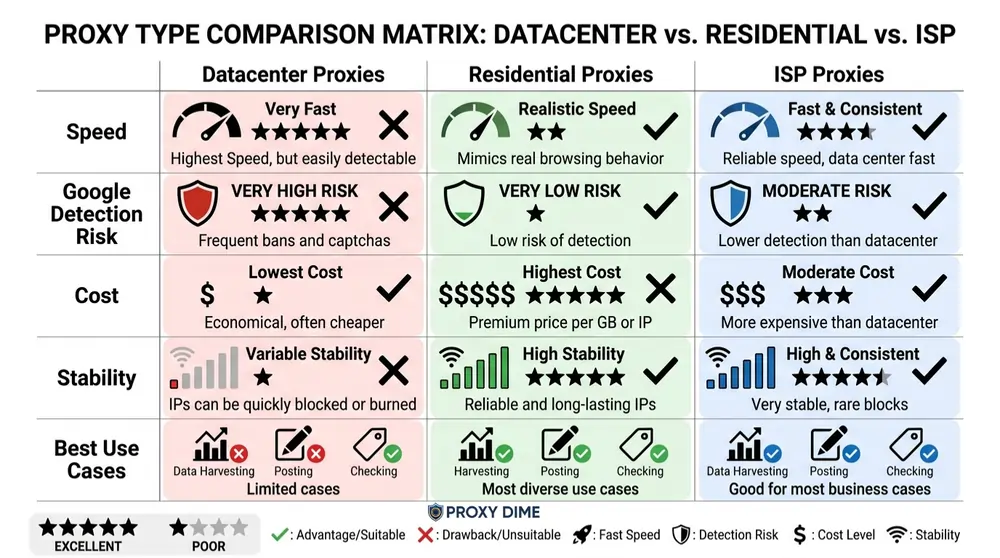
Rotating residential proxies solve this for harvesting and bulk scraping tasks because each request arrives from a genuine ISP address that Google treats like a normal user. Static datacenter proxies still work well for backlink checking, sitemap generation, and contact form scraping on smaller sites that do not run aggressive anti-bot systems.
ISP proxies bridge the gap with residential trust at datacenter stability, making them the strongest choice for sustained ScrapeBox sessions that mix harvesting with posting.
Proxies for ScrapeBox 2026: Full Breakdown
| Proxy Provider | ScrapeBox Strength | Ideal User |
|---|---|---|
| Decodo | Official ScrapeBox integration | SEO agency operators |
| Oxylabs | 99.9% uptime SERP scraping | Enterprise link builders |
| Webshare | Free 10 proxy starter | ScrapeBox beginners |
| Bright Data | Unlimited DC bandwidth | Bulk keyword harvesters |
| Thordata | $0.65/GB high thread support | Budget SEO freelancers |
| Proxy-Seller | Dedicated ScrapeBox guide | Static IP link checkers |
| ZenRows | Anti-bot SERP bypass | Protected site scrapers |
1. Decodo
Decodo is the only provider on this list with a published, step-by-step ScrapeBox integration guide on their official site. That matters because ScrapeBox proxy configuration is not straightforward. The endpoint generator in Decodo's dashboard creates proxy lists formatted specifically for ScrapeBox's Proxy Manager, with authentication, location, session type, and protocol already configured.
The residential pool of 125 million plus IPs supports both HTTP(S) and SOCKS5 with unlimited threads and concurrent sessions. Response time sits under 0.6 seconds with a 99.86% success rate.
For a keyword harvesting session pulling 10,000 URLs across Google, Bing, and Yahoo simultaneously, that combination of speed, protocol flexibility, and thread count means the harvester completes the job without proxy failures stalling threads.
Decodo Pros
Decodo Cons
Free 3 day residential trial, ScrapeBox ready
Unlimited threads, dual protocol support, and a 99.86% success rate on search engine queries make it the most ScrapeBox-compatible residential option available. The 3 day free trial lets you test against your exact harvesting footprints before spending.
2. Oxylabs
Oxylabs brings the largest verified IP pool to ScrapeBox workflows at 175 million plus residential addresses across 195 countries. For ScrapeBox users running the keyword harvester across Google, Bing, and Yahoo simultaneously with 30 plus search engine footprints, that pool depth prevents IP exhaustion during extended sessions.
The 99.9% uptime guarantee means the proxy list stays healthy throughout a 6 hour harvesting job without dead IPs clogging threads. Datacenter proxies come with unlimited bandwidth on a per-IP pricing model starting at $1.20 per IP, which suits ScrapeBox backlink checking where thread count matters more than geographic targeting.
Automatic IP rotation switches addresses with each request for harvesting, while sticky sessions hold for up to 30 minutes for comment posting workflows that need consistent identity.
Oxylabs Pros
Oxylabs Cons
⚡ Massive 40% Oxylabs Discount Alert!

Boost your scraping game with 40% off Oxylabs' reliable proxies and APIs. Enterprise-grade power at a steal. Enter OXYLABS40 at checkout and save big instantly!
The unlimited datacenter bandwidth model works particularly well for ScrapeBox backlink checking and sitemap generation where you need thousands of connections but the per-request data transfer is small.
3. Webshare
Webshare gets ScrapeBox beginners running without spending anything. The free plan includes 10 SOCKS5 and HTTP proxies with 1 GB of monthly bandwidth. Load those 10 addresses into ScrapeBox's Proxy Manager, set threads to 1 per proxy (following the safe ratio for datacenter IPs on Google) and you have a working harvester configuration at zero cost.
The paid datacenter tier at $0.029 per IP scales that setup affordably. Buy 100 datacenter proxies for under $3, configure ScrapeBox to rotate through them, and you can handle moderate keyword harvesting and backlink checking jobs without touching residential pricing.
SOCKS5 support is included on all plans at no extra cost, which matters for ScrapeBox users running the blog comment poster through SOCKS5 connections.
Webshare Pros
Webshare Cons
Start with 10 free proxies, SOCKS5 included
For backlink checking, email scraping, and domain availability checking (all lower risk ScrapeBox tasks), this approach works consistently at a fraction of residential cost.
4. Bright Data
Bright Data handles the ScrapeBox workflows that other providers cannot sustain. When you need 50,000 keyword variations harvested from Google in a single session, the 150 million plus residential pool absorbs that volume without IP recycling.
The datacenter proxies offer unlimited bandwidth on a per-IP model, which means ScrapeBox backlink checking across 100,000 URLs costs nothing beyond the IP rental. The Proxy Manager (an open source tool) lets you create separate proxy zones for different ScrapeBox tasks. One zone with rotating residential for Google harvesting.
Another zone with dedicated datacenter for blog comment posting. A third zone with ISP proxies for rank checking. That separation prevents cross-contamination between aggressive and conservative ScrapeBox operations. ScrapeBox connects to Bright Data through standard HTTP(S) proxy settings or the local Proxy Manager port.
Bright Data Pros
Bright Data Cons
Free trial with deposit match up to $500
Google harvesting gets rotating residential. Blog commenting gets sticky ISP. Backlink checking gets unlimited datacenter. That task-level control prevents the IP burning that derails multi-function ScrapeBox sessions.
5. Thordata
Thordata makes residential proxies accessible at ScrapeBox-friendly pricing. The PAYG rate drops to $0.65 per GB at modest volume, and the 100 million plus IP pool across 190 countriess provides enough addresses for Google keyword harvesting across multiple markets.
HTTP support connects directly to ScrapeBox's proxy settings, and the standardised API integration means you can generate endpoint lists in the format ScrapeBox expects. A 1 GB free residential trial at no cost lets you test harvester performance against Google's current anti-automation filters before committing to a plan.
The $13 per month starter plan suits SEO freelancers who run ScrapeBox campaigns weekly rather than daily. ASN-level filtering means you can select IPs from specific internet providers, which reduces the chance of ScrapeBox pulling from already-flagged IP ranges during a Google harvest.
Thordata Pros
Thordata Cons
Free 1 GB residential trial, PAYG from $0.65/GB
6. Proxy-Seller
Proxy-Seller published a dedicated ScrapeBox proxy setup guide with thread ratios, connection settings, and retry configurations specific to their proxy infrastructure. That guide recommends setting connections at 25% of your account's allowed threads to avoid overloading the proxy endpoints during ScrapeBox harvesting.
The dedicated IP model means each proxy in your ScrapeBox list is exclusively yours. No other user's ScrapeBox session is burning through the same addresses simultaneously. That exclusivity matters for blog comment posting where the same IP needs to hit multiple WordPress, Blogger, and guestbook platforms without previous abuse history contaminating your reputation.
ISP proxies start at $3 per IP monthly, and dedicated IPv4 addresses from $18 per month provide the static stability that ScrapeBox's backlink checker needs for consistent results across repeated checks.
Proxy-Seller Pros
Proxy-Seller Cons
ScrapeBox optimised, dedicated IPs from $3/month
7. ZenRows
ZenRows takes a different approach to the ScrapeBox problem. Rather than feeding proxy lists into ScrapeBox's Proxy Manager, the Universal Scraper API bypasses the proxy management layer entirely. When Google's anti-bot systems block even residential proxies during a ScrapeBox SERP harvest, the ZenRows API handles JavaScript rendering, CAPTCHA solving, and IP rotation server-side.
You send a URL or list of URLs. ZenRows returns the data. This works as a complement to ScrapeBox rather than a replacement. Run ScrapeBox for blog commenting, backlink checking, and email scraping with traditional proxies, and route the Google SERP harvesting through ZenRows when standard proxies cannot break through.
The Developer plan at $49 per month covers 250,000 API credits, which is roughly 250,000 individual page fetches.
ZenRows Pros
ZenRows Cons
Free trial, bypasses Google CAPTCHAs
How to Match Proxy Types to Each ScrapeBox Workflow
Matching Proxies to ScrapeBox Tasks
Not every ScrapeBox function needs the same proxy type. The keyword harvester hitting Google is a fundamentally different operation from the blog commenter posting to WordPress sites. Here is how to allocate proxy resources across the main ScrapeBox workflows.
Google and Bing Keyword Harvesting
The harvester sends hundreds of search queries across multiple engines simultaneously using ScrapeBox's threading system. Google blocks datacenter IPs aggressively for automated search queries. Rotating residential proxies are the only reliable option for sustained harvesting sessions.
Set the thread count to match your proxy list size at a 1 to 1 ratio for residential IPs. Uncheck “Remove failed proxies” if using backconnect rotating endpoints, since each retry gets a new IP automatically. Decodo and Thordata give the best cost-to-success ratio here.
Mass Blog Comment Posting
The comment poster needs proxies that hold a consistent identity long enough to complete a form submission on each target blog. Sticky ISP proxies work best because they maintain the same address for 10 to 30 minutes while carrying residential trust scores that blog platforms accept.
Proxy-Seller dedicated ISP addresses at $3 per month are built for this workflow. Set ScrapeBox delays between posts to 5 to 10 seconds per proxy to avoid triggering spam filters on WordPress and Blogger platforms.
Backlink Checking and Link Verification
The backlink checker visits thousands of URLs to verify that your links are still live and the anchor text is correct. These targets are typically smaller sites with less aggressive anti-bot systems. Datacenter proxies with unlimited bandwidth are the most cost-effective choice.
Oxylabs datacenter at $1.20 per IP with unlimited bandwidth or Webshare at $0.029 per IP both handle this task without the per-GB cost of residential. Higher thread counts (10 to 20 per proxy) work safely on most non-Google targets.
Email and Contact Scraping
ScrapeBox's email scraper harvests contact information from web pages. The targets vary widely from WordPress sites to corporate pages. Rotating residential proxies at lower thread counts avoid blocks while keeping the data fresh. Thordata at $0.65 per GB keeps costs manageable for large email scraping campaigns that consume moderate bandwidth.
Proxy Harvesting and Testing
ScrapeBox includes a built-in proxy harvester that collects free proxy lists from published sources and tests them. Use this feature to supplement your paid proxies with free addresses for lower-risk tasks. After harvesting, filter by speed and Google-pass status. Only Google-passed proxies should be used for search engine harvesting tasks.
Final Thoughts
Decodo is the clearest pick for ScrapeBox because the official integration guide removes the configuration friction that wastes most users' first session. Thordata at $0.65 per GB makes residential harvesting affordable for freelancers who run ScrapeBox weekly. Webshare gets beginners started at zero cost with 10 free proxies and SOCKS5 included.
Start with the free options. Test your harvesting footprints against your actual targets. The proxies that pass Google's check on your specific queries are the ones worth scaling. Every ScrapeBox setup is slightly different, and the only reliable test is the one you run yourself.