You wrote the Playwright script. It worked perfectly on your local machine. Then you deployed it, and within 200 requests, Cloudflare started serving challenge pages. Your headless Chrome fingerprint was flagged, your IP got blocked, and the entire pipeline went dark. Building web scrapers is straightforward. Keeping them alive at scale against modern anti-bot systems is a different discipline entirely.
A scraping browser eliminates this problem by moving the entire browser environment to the cloud. These are not simple headless instances running on your laptop. They are fully managed, remotely hosted browsers with built-in proxy rotation, CAPTCHA solving, and browser fingerprint randomisation.
You connect your existing Puppeteer, Playwright, or Selenium scripts to the provider's endpoint. They handle the infrastructure war. You focus on the data.
I have tested six cloud scraping browsers against JavaScript heavy targets, Cloudflare protected domains, and high concurrency requirements. Here is what actually works in 2026.
Headless Chrome Is Dead for Production Scraping
A scraping browser is a cloud-hosted, remotely controlled web browser specifically built to extract data from websites that actively block automated access.
Standard headless browsers like Puppeteer and Playwright are open-source tools that give developers browser automation. The problem is that websites can detect them almost immediately.
Anti-bot systems check hundreds of signals: the navigator.webdriver property, missing GPU metadata, inconsistent font rendering, and canvas fingerprint anomalies. A vanilla Playwright instance fails these checks within seconds on any serious target.
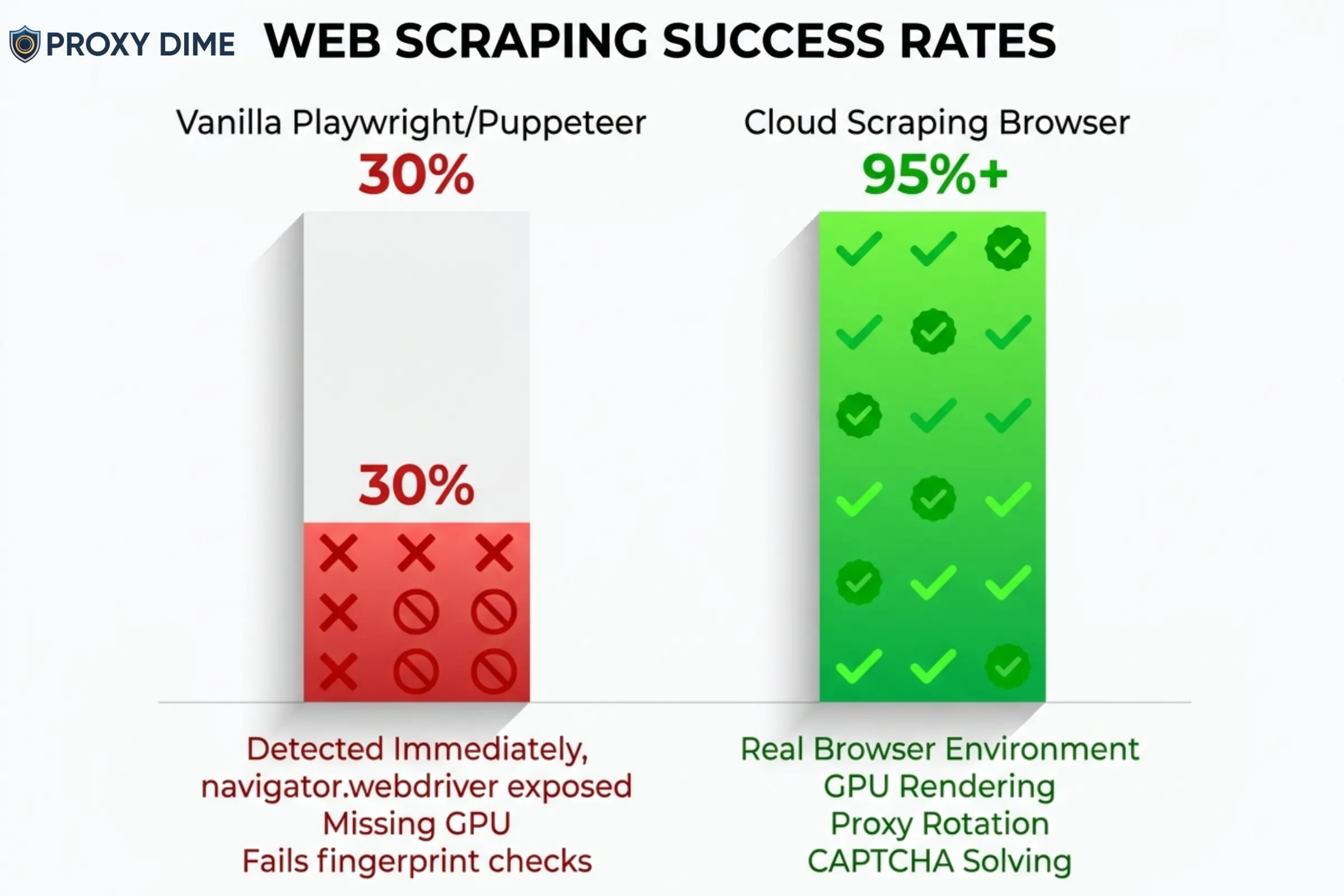
Cloud scraping browsers solve this by running a full graphical browser on the provider's infrastructure. Bright Data's Browser API, for example, is technically a “headful” GUI browser running remotely, but your code interacts with it as if it were headless.
Because it renders with a real GPU and real window dimensions, anti-bot systems see a genuine user session. The provider layers proxy rotation, CAPTCHA solving, and cookie management on top automatically.
The result? Your existing scripts work. They just connect to a different endpoint. And the success rate jumps from 30% to 95%+ on protected targets.
6 Cloud Scraping Browsers That Handle Anti-Bot Systems in 2026
| Scraping Browser | Core Advantage | Built For |
|---|---|---|
| Bright Data | Unlimited concurrent sessions | Enterprise data pipelines |
| Oxylabs | AI agent MCP integration | Automation engineers |
| Decodo | 100+ ready scraping templates | Non-technical teams |
| ZenRows | Anti-bot bypass engine | Protected domain scrapers |
| Thordata | Budget cloud browser | Cost-sensitive developers |
| Webshare | DIY Playwright proxy layer | Custom script builders |
1. Bright Data Browser API
Bright Data operates what is arguably the most mature scraping browser on the market. Their Browser API runs fully hosted GUI browsers on Bright Data's own infrastructure. You connect your Puppeteer, Playwright, or Selenium scripts to a WebSocket endpoint with a single line of code change. From there, the browser handles everything that normally breaks a scraping pipeline.
CAPTCHA solving runs automatically in the background. Browser fingerprints rotate to mimic real user devices. Proxy rotation pulls from a pool of over 150 million residential IPs with geographic targeting down to city, ZIP code, and ASN level.
The critical differentiator is that Bright Data places no limit on concurrent browser sessions. If your server can process the data, their infrastructure will match the load. That makes this the only realistic option for enterprise teams running tens of thousands of simultaneous browser instances overnight.
Bright Data Pros
Bright Data Cons
Unlimited sessions, free trial available
2. Oxylabs Headless Browser
Oxylabs built its Headless Browser as a remote browsing solution with stealth patched directly into the browser binary. Unlike a standard Puppeteer setup where you apply stealth plugins yourself, the Oxylabs browser arrives pre-configured to bypass CAPTCHAs including hCaptcha, reCAPTCHA, and Cloudflare Turnstile.
It supports both Chromium and Firefox, which matters when certain targets specifically flag Chrome-based automation. The real innovation is the Model Context Protocol (MCP) integration. This allows AI agents running in Claude Desktop or Cursor to directly control the browser, opening the door to AI-driven data extraction workflows where the agent navigates, scrolls, clicks, and extracts without human scripting.
For teams building autonomous web agents, this is currently the only production-ready cloud browser with native MCP support.
Oxylabs Pros
Oxylabs Cons
⚡ Get 40% Off Oxylabs Proxies Now!
Slash 40% off premium Oxylabs proxies and web scraping tools. Perfect for data pros needing speed and scale. Grab code OXYLABS40 today.
The pre-patched stealth also means fewer maintenance headaches compared to stacking open-source plugins.
3. Decodo
Decodo approaches the scraping browser category differently. Rather than asking developers to write Playwright scripts and connect them to a remote endpoint, Decodo wraps the entire process in a managed Web Scraping API with over 100 pre-built templates. You do not need to write code to scrape Amazon product pages, Google search results, or social media profiles.
The API handles JavaScript rendering, proxy rotation through 125 million residential IPs, and anti-bot bypassing automatically.
For tasks that do require custom scripting, you can enable headless browser rendering on any API request and receive the fully rendered HTML or parsed JSON. This makes Decodo the most accessible option for teams that need browser-level scraping results without browser-level engineering complexity.
Decodo Pros
Decodo Cons
100+ templates, free trial included
Developers still get API access for custom jobs, but the real value is democratising browser-level scraping across the organisation.
4. ZenRows
ZenRows operates a dedicated Scraping Browser alongside its Universal Scraper API, and the two products share bandwidth allocations within the same plan. The Scraping Browser is a cloud-hosted Chromium instance that routes through ZenRows' residential proxy infrastructure with anti-bot bypass logic applied at the network level.
Where ZenRows genuinely excels is on heavily protected domains. Their system analyses the target's anti-bot stack in real time and adjusts the browser fingerprint, header configuration, and proxy selection dynamically.
The free trial provides 100 MB of Scraping Browser bandwidth and 1,000 protected API requests, which is enough to test against your actual targets before committing. For developers scraping financial data portals, travel booking engines, or enterprise SaaS dashboards behind aggressive WAF protection, ZenRows is the specialist tool.
ZenRows Pros
ZenRows Cons
Free trial with 100 MB browser bandwidth
5. Thordata
Thordata entered the scraping browser market with a product designed to undercut the premium pricing of Bright Data and Oxylabs while still delivering core anti-bot functionality. Their Scraping Browser API is a remote headful browser with built-in stealth and proxy integration.
It handles JavaScript rendering, simulates human interactions like scrolling and clicking, and customises browser fingerprints to mimic organic user activity. The key selling point is accessibility.
Thordata positions this as the scraping browser for developers who need cloud browser infrastructure but cannot justify $300+ monthly minimums. The API allows you to submit custom browser instructions for specific interaction sequences, which means you can automate multi-step workflows like logging into a portal, navigating to a specific page, and extracting the rendered content.
Thordata Pros
Thordata Cons
Budget-friendly cloud browser, residential from $0.65/GB
6. Webshare
Webshare does not sell a managed scraping browser product. What they provide is the high-performance proxy infrastructure that allows experienced developers to build their own cloud scraping browser setups using Playwright or Puppeteer.
If you already maintain a self-hosted headless browser fleet and need reliable rotating proxies to power it, Webshare's datacenter and residential pools integrate directly with any browser automation framework. The advantage is total control and dramatically lower cost.
Instead of paying $5 to $8 per GB for a managed browser service, you pay Webshare's proxy rates (starting at $0.029/proxy for datacenter) and handle the browser infrastructure yourself. For engineering teams with the skill to manage Playwright clusters, apply stealth patches, and handle CAPTCHA solving independently, this is the most cost-effective foundation.
Webshare Pros
Webshare Cons
10 free proxies, build your own scraping browser stack
Managed vs Self-Hosted Scraping Browsers
Choosing between a fully managed cloud browser and a DIY setup is the biggest architectural decision in any scraping project. Here is how the trade-offs break down in practice.
| Factor | Managed (Bright Data, Oxylabs) | Self-Hosted (Webshare + Playwright) |
|---|---|---|
| Setup Time | Minutes (single endpoint) | Days to weeks (full stack) |
| Anti-Bot Maintenance | Provider handles updates | Your engineering team |
| Cost at 100 GB/month | $500 to $800 | $50 to $150 (proxies only) |
| Concurrency Control | Provider managed | You manage servers |
| CAPTCHA Solving | Built-in | Third-party integration |
For teams scraping fewer than 50 GB per month on moderately protected targets, a managed browser pays for itself in engineering time saved. For teams with dedicated infrastructure engineers scraping hundreds of GB against targets they deeply understand, the self-hosted approach using Webshare proxies can cut costs by 70% or more.
What to Look for in a Scraping Browser for Production Workloads
JavaScript Rendering Speed
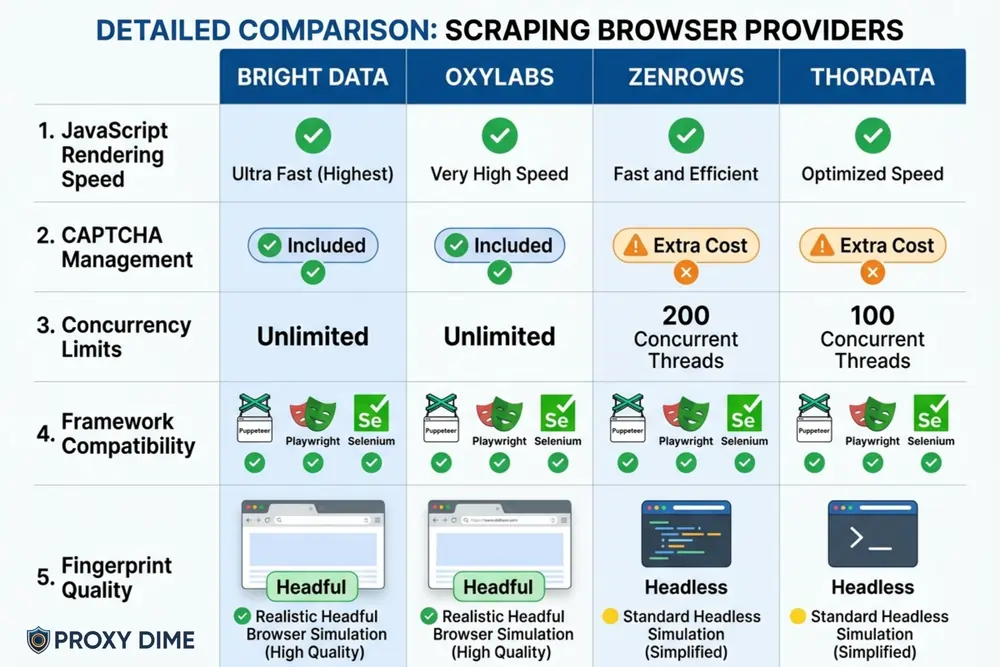
Every modern single-page application loads data via JavaScript. If your scraping browser cannot render React, Angular, or Vue components, you will extract empty HTML shells. Both Bright Data and Oxylabs execute JavaScript natively within their cloud browsers. Verify that the provider renders dynamically loaded content, not just the initial HTML payload.
CAPTCHA Management Without Extra Charges
Some providers charge separately for CAPTCHA solving. Bright Data includes it in the base Browser API price. Oxylabs handles hCaptcha, reCAPTCHA, and Turnstile at no additional cost. Ask specifically whether CAPTCHA resolution is bundled or billed as an add-on. For targets with aggressive challenge pages, this cost difference compounds quickly.
Concurrency Limits
Concurrency determines how many pages you can scrape simultaneously. ZenRows caps at 200 sessions on their highest tier. Bright Data imposes no limit. If your workflow involves batch processing thousands of URLs overnight, a concurrency cap will directly extend your total scraping time.
Framework Compatibility
Your existing codebase matters. Bright Data supports Puppeteer, Playwright, and Selenium natively. Oxylabs supports Puppeteer, Playwright, and CDP tools but not Selenium. If your current scripts are built on Selenium, switching providers could mean rewriting your entire automation layer. Always verify framework support before committing.
Fingerprint Quality
The difference between a headless and headful browser is critical for detection avoidance. Bright Data and Thordata run headful (GUI) browsers that generate genuine rendering artefacts. Vanilla Puppeteer produces headless fingerprints that advanced anti-bot systems detect instantly. Prioritise providers that explicitly run GUI browsers on their infrastructure.
Frequently Asked Questions About Scraping Browsers
What is a scraping browser?
A scraping browser is a cloud-hosted, remotely controlled web browser built specifically for automated data extraction. Unlike local headless browsers, it includes built-in proxy rotation, CAPTCHA solving, and browser fingerprint management. Developers connect their existing Puppeteer or Playwright scripts to the provider's endpoint and the remote browser handles anti-bot evasion automatically.
How is a scraping browser different from Puppeteer?
Puppeteer is an open-source library that controls a local Chromium instance. A scraping browser runs on the provider's servers with stealth features pre-configured. Puppeteer scripts connect to a scraping browser via a WebSocket URL change. The provider manages the proxy network, solves CAPTCHAs, and randomises fingerprints, while Puppeteer alone does none of those things.
Do scraping browsers work with Playwright?
Yes. Bright Data, Oxylabs, and ZenRows all support Playwright natively. You replace your local browser launch command with a connection to the provider's CDP endpoint. Your existing Playwright test scripts, page interactions, and selectors remain unchanged.
How much do scraping browsers cost?
Pricing ranges from $5 to $8 per GB for managed solutions. Bright Data starts at $8/GB pay-as-you-go, dropping to $5/GB at the $1,999/month tier. Oxylabs starts at $6/GB with a $300/month minimum. ZenRows begins at $5.50/GB within their $69/month developer plan. Self-hosted setups using Webshare proxies can reduce the proxy cost to under $1/GB.
Can a scraping browser bypass Cloudflare?
Yes. Modern scraping browsers from Oxylabs and Bright Data specifically target Cloudflare Turnstile, hCaptcha, and reCAPTCHA challenges. They solve these automatically in the background during a browser session. Success rates vary by target, but managed browsers consistently outperform local headless instances against Cloudflare-protected domains.
Is using a scraping browser legal?
Using a scraping browser to extract publicly available data is generally legal in most jurisdictions. The precedent set by the hiQ Labs v. LinkedIn ruling supports scraping of public information. However, scraping behind login walls, violating Terms of Service, or extracting personal data may create legal risk. Always consult legal counsel for your specific use case and jurisdiction.
Final Thoughts
For enterprise-scale extraction with no concurrency limits, Bright Data Browser API remains the industry standard. If your team is building AI-powered browsing agents, Oxylabs Headless Browser with MCP integration is currently the only production-ready option.
Teams that need scraping results without writing browser automation code should start with Decodo's template library. And developers comfortable managing their own infrastructure can save significantly by pairing Webshare proxies with a self-hosted Playwright cluster.
Most of these providers offer free trials. Use them against your actual targets before committing to a monthly plan. The success rate on your specific websites matters far more than any benchmark published on a marketing page.